2012年2月23日 星期四

FreeTDS 小筆記

Linux console下用來連接  MSSQL 的工具。

Centos 5 安裝: yum install freetds

mandrake 2008 安裝: urpmi libfreetds_mssql

Debian 安裝:apt-get install freetds-bin


網站:
http://www.freetds.org

使用:
tsql : 互動式命令列,sql敘述最後要輸入 go 執行

tsql  { -S servername [-I interface] | -H hostname -p port }
             -U username [-P password] [-o options]


bsqldb:可以批次執行sql script 文字檔案,並將輸出存至 output filename
bsqldb 
        [-U username] [-P password]
        [-S servername] [-D database]
        [-i input filename] [-o output filename] [-e error filename]


2012年2月17日 星期五

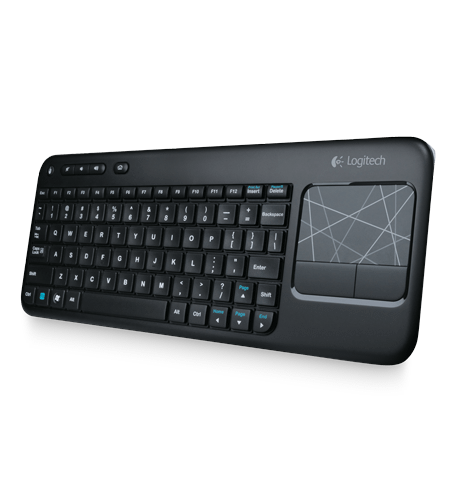
Logitech K400 wireless 鍵盤 + Ubuntu

Logitech K400 wireless 鍵盤 + Ubuntu

在Ubuntu 10.10 底下作用正常,plug&play。

插上無線接收器之後,系統即出現

[ 5225.980262] input: Logitech USB Receiver as /devices/pci0000:00/0000:00:1a.0/usb1/1-1/1-1.3/1-1.3.4/1-1.3.4.4/1-1.3.4.4:1.0/input/input11
[ 5225.980479] generic-usb 0003:046D:C52B.0002: input,hidraw1: USB HID v1.11 Keyboard [Logitech USB Receiver] on usb-0000:00:1a.0-1.3.4.4/input0
[ 5225.982735] input: Logitech USB Receiver as /devices/pci0000:00/0000:00:1a.0/usb1/1-1/1-1.3/1-1.3.4/1-1.3.4.4/1-1.3.4.4:1.1/input/input12
[ 5225.983180] generic-usb 0003:046D:C52B.0003: input,hiddev96,hidraw2: USB HID v1.11 Mouse [Logitech USB Receiver] on usb-0000:00:1a.0-1.3.4.4/input1
[ 5225.986238] generic-usb 0003:046D:C52B.0004: hiddev97,hidraw3: USB HID v1.11 Device [Logitech USB Receiver] on usb-0000:00:1a.0-1.3.4.4/input2

打開鍵盤上的on/off開關,就可以使用。觸控版的兩指頁面上下捲動正常,鍵盤上的音量控制鍵、首頁、左上角滑鼠左鍵按鈕、FN+功能鍵都可正常動作。

這隻鍵盤的優點:
  1. 便宜,pchome特價才999
  2. 觸控版有兩指頁面上下捲動
  3. 官方號稱很省電:「長達 12 個月的電池壽命

缺點:

  1. 便宜貨,整個鍵盤的塑膠感就是很廉價(和Sony的PS3藍牙鍵盤沒的比)
  2. 鍵盤觸感不佳
  3. 整體操作便利程度,觸控版還是不如小紅點(個人使用習慣)


2012年2月16日 星期四

用手機發blog?

有方便到嗎?還是只為了mobile 而"行動"?
來杯鹿谷的冬片子烏龍,喝茶吧。


2012年2月15日 星期三

Debian wheezy on Thinkpad X61

Debian wheezy on Thinkpad X61
Installing :
using weekly build iso ( 13-Feb-2012 ) from http://cdimage.debian.org/cdimage/weekly-builds/amd64/iso-cd/

  1. Graphic install option not work.
  2. linux kernel 3.2.0
  3. use network mirror in US
  4. wait for 1 hour.. don't leave your seat, you will have to enter SMB workgroup name to continue.
  5. after first login, remove cdrom from source.lst
  6. for build-in Intel Wireless 3945 ABG ,  modify /etc/apt/source.lst ,  add non-free , then apt-get install firmware-iwlwifi
  7. enable trackpoint wheel emulation , apt-get install gpointing-device-settings , then run gpointing-device-settings, configure wheel emulation button:2   update: reference this page "Enabling TrackPoint scrolling in Debian Wheezy"
  8. browse https://extensions.gnome.org , install extra gnome-shell extensions
  9. apt-get install ibus ibus-anthy ibus-chewing fonts-arphic-ukai fonts-arphic-uming ( for traditional chinese support in English locale )
  10. apt-get install libcurl3 libxss1 , then download Google Chrome and install. After install Chrome, ln -s /opt/google/chrome/google-chrome.desktop ~/.local/share/applications/

Sony PS3 藍牙鍵盤

Sony PS3 藍牙鍵盤的耗電大缺點,現在我也感受到了。剛開始使用Sony隨機送的鹼性電池,撐比較久,誤以為耗電還好。一換到傳統電池就....南無。使用大賣場的廉價單三電池,用不到兩天就沒電。

2012年2月13日 星期一

美軍士兵守則

美軍士兵守則
  1. You are not a superman。你不是超人。(不要無謂的冒險、不要做傻事) 
  2. If it's stupid but works,it isn't stupid。如果一個蠢方法有效,那它就不是一個蠢方法。 
  3. Don't look conspicuous - it draws fire。 (This is why aircraft carriers are called "Bomb Magnets"。)不要太顯眼,因為那會引來對方火力攻擊。(這就是航母被稱為"炸彈磁鐵"的原因。)
  4. Never share a foxhole with anyone braver than you are。別和比你勇敢的戰友躲在同一個散兵坑裏。 
  5. Never forget that the lowest bidder made your weapon。別忘了你手上的武器是由最低價的承包商得標製造的。 
  6. If your attack is going really well,it‘s an ambush。如果你的攻擊進行得很順利,那一定是你中了圈套。 
  7. All five-second grenade fuses will burn down in three seconds。所有五秒的手榴彈引線都會在三秒內燒完。
  8. Try to look unimportant because bad guys may be low on ammo。儘量顯得是一個無關緊要的人,因為敵人可能彈藥不夠了。(他會先打最重要的人)
  9. If you are forward of your position,the artillary will fall short。每當你要攻擊前進時,炮兵往往也快要用完了炮彈。 
  10. The enemy diversion you are ignoring is the main attack。那支你以為是敵軍疑兵而不加注意的部隊恰恰就是敵人的攻擊主力。 
  11. The important things are always simple。重要的事總是簡單的。 
  12. The simple things are always hard。簡單的事總是難作到。
  13. The easy way is always mined。好走的路總是已被敵軍布上了地雷。
  14. If you are short of everything except enemy。 You are in combat。如果你除了敵人不缺,其他什麼都缺,那你往往就要面臨作戰了。 
  15. Incoming fire has the right of way。飛來的子彈有優先通行權。(擋它的道你就要倒大楣!) 
  16. If the enemy is in range,SO ARE YOU!!!如果敵人正在你的射程內,別忘了你也在他的射程內。 
  17. No combat ready unit has ever passed inspections。從沒有一支完成戰備的單位能通過校閱。 
  18. Things that must be together to work usually can‘t be shipped together。必須要裝配在一起才能發揮效力的武器裝備通常不會一起運來。 
  19. Radio‘s will fail as soon as you need fire support desperately。無線電通訊會有可能在你急需火力支援時失靈。 
  20. Anything you do can get you shot - including doing nothing。你作的任何事都可能挨槍子兒 -- 包括你什麼都不做。
  21. Tracers work both ways。曳光彈可以幫你找到敵蹤;但也會讓敵人找到你。
  22. The only thing more accurate than incoming enemy fire is incoming friendly fire。唯一比敵人火力還精確的是友軍打過來的炮火。(誤射) 
  23. Make it tough for the enemy to get in and you can‘t get out。當你防守嚴密到敵人攻不進來時,那往往你自己也打出不去。
  24. If you take more than your fair share of objectives, you will have more than your fair share of objectives to take。如果你多報戰功,那下次你會被給予超過你能力的目標讓你去打。(自討苦吃)
  25. When both sides are convinced that they are about to lose, they are both right。當兩軍都覺得自己快輸時,那他們可能都是對的。 
  26. Professional soldiers are predictable but the world is full of amateurs。專業士兵的行為是你能預測的,可惜戰場上業餘的士兵占多數,因此敵人的行為大部分是你所無法預測的。

2012年2月4日 星期六

Vlan 測試心得筆記


Vlan 測試心得筆記
今天才發現自己的vlan核心觀念是錯的,尤其是要串接多個L2 switch時。心得筆記如下:

  1. 先實體線路串接,再考慮切vlan。實體網路連結依然不可有loop
  2. tag port 可以收發taged or untaged 封包,untag port則會丟棄 taged 封包
  3. 一般電腦、一般switch上的port是 untaged
  4. switch 串接之後(假設串接port為#1),不同switch上面的不同vlan ID,例如 SW1 上的vlan 11要和SW2上的vlan11互通,則SW1的vlan11成員需包含SW1的port #1,SW2的vlan11成員需包含SW2的port #1;SW1 上的vlan 22要和SW2上的vlan22互通,則SW1的vlan22成員需包含SW1的port #1,SW2的vlan22成員需包含SW2的port #1。
  5. Switch上每個port最多只能設定一個 untag Vlan ID,但可以同時設定成為多個不同的 tag Vlan ID,PVID作用是當流入Port的frame沒有VID(untag)時,自動將 untag frame 加上指定的PVID,然後轉送。
  6. 一般PC / NB / Server 的網路卡通常都沒設定VLAN,也就是Frame 沒有VLAN tag。而交換器所有port一般預設設定 為 untag PVID =1,如果PC有設定VID, 就會判斷流入frame是否屬於相同VID,是-->轉送,否-->丟棄。如果PC沒有設定VLAN VID,則加上 port的PVID,轉送。
  7. 個人習慣:串接port設定為vlan 1 untag + all other vlan ID taged,接電腦、伺服器、其他網路設備的port依狀況分配 untag vlan ID。最後再留下一個port(例如 port#23)設定為management port + untag vlan 1,以方便直接透過網路來設定管理switch